


National Casino App
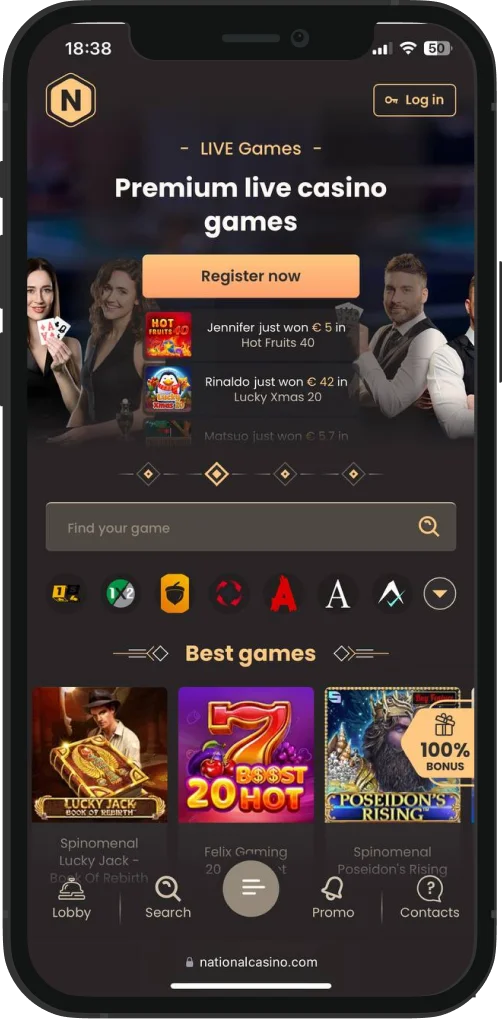
At National Casino, you can expect a downloadable mobile app for both Android and iOS. Inside it, you get the full range of bonuses from the welcome pack to the highroller deal, crypto welcome bonus, reloads, and daily promos — plus every game, tool, payment option, and tournament.
If you don’t want to download anything, National Casino also has a fully functioning mobile site that works on any browser. Below, we’ll explain the app’s features, how to download it, and which devices it works best on.

How to Download & Install the National Casino App
Downloading and installing the National Casino app is a standard, simple process. It automatically detects your device type (Android or iOS) and directs you to the right version. Expect the app to take up around 80-120 MB of storage, depending on your device. Installation is quick — we got it in under a minute. Once installed, the app icon appears in the menu or on your home screen, so you can open it like any other app.


Android Download and Installation Steps You Must Know
National Casino has a free Android version that’s easy to get and use. The app automatically detects that you’re using an Android device, so you just need to follow these steps:
- Open National Casino in your browser and tap the menu on the left.
- Select “Application” and confirm that it detects your Android device.
- Allow the device to download from “trusted sources” if prompted.
- Wait for the download to complete — takes around 30-45 seconds on a standard connection.
- Tap the downloaded file and follow the on-screen prompts to install.
- Open the app, log in, and check for any permissions it asks for (notifications, storage, and more).


How the iOS App Download Works
National Casino also offers a free iOS app that’s equally easy to install. Just like the Android version, it automatically detects your device and guides you to the right download:
- Open National Casino in Safari on your iPhone or iPad.
- Tap the menu on the left and select “Application.” The site will detect your iOS device automatically.
- Confirm the download when prompted. iOS may ask you to allow app installation from the browser.
- Wait for the download for 25-40 seconds.
- Tap the icon on your home screen to open the app.
- Log in and grant necessary permissions (notifications, storage, and more).



National Casino App Features & Benefits
The National Casino app is basically the full website in your pocket, but it comes with some real advantages. You get all the same games, bonuses, tournaments, and payment options, but in a version that’s faster, easier to navigate, and more secure on mobile.
Here’s a list of the app’s main advantages:
- You get full access to all the bonuses — welcome pack, highroller, crypto promo, reloads, and daily offers.
- Faster loading times, with games and pages loading 20-30% faster than on mobile browsers.
- One-tap deposits and withdrawals using mobile wallets like Google Pay or Apple Pay.
- App-only bonuses like the 10 free spins for new users.
- Offline notifications that help you never miss a daily promo or tournament update.
- Smooth navigation with menus and filters designed for touch screens.
During our crash tests, we also found that the app is even better than the site in some ways. It’s more portable, secure, optimized for mobile, and even has exclusive features that you won’t find on the main platform.

Portability
We have a serious portability verification routine: using the app on the go, monitoring battery usage, and checking performance during travel and different network conditions. Both versions handled all of it without any major issues:
- Battery Usage: about 8–10% per hour during heavy play on mid-range devices.
- Network Flexibility: works smoothly on both 4G and stable 5G connections; slight delays on weak 3G.
- Quick Launch: opens in 8–12 seconds, even on older phones.
- Offline Convenience: keeps you logged in, so you can resume quickly after interruptions.
- Lightweight Design: less than 150–200 MB, leaving space for other apps and files.
Security
We tested the app’s security by checking data encryption, login protections, and transaction safety. The goal was to see if using the app on mobile adds any risks compared to the website. Here’s what we found:
- Encrypted Connections: all the traffic uses 128–256 bit SSL encryption — same as the main site.
- Two-Step Verification: optional 2FA adds extra protection when logging in.
- Secure Payments: deposits and withdrawals through Apple Pay, Google Pay, and major cards are processed without storing sensitive data on the device.
- Automatic Logout: if the app is idle for more than 15 minutes, it logs out to prevent unauthorized access.
- App Sandboxing: the app runs in its own environment on your phone, reducing risks from other apps or malware.
Mobile Optimization
We also loaded the app on several phones to see how well it adapts to different screen sizes and hardware. The idea was to check if the games and menus run smoothly without glitches or slowdowns. Here are the results:
- Screen Fit: games and menus scale perfectly on phones with 5.5–7” screens.
- Responsive Design: menus, filters, and buttons adjust perfectly for portrait or landscape mode.
- Load Times: games load in 3–5 seconds on mid-range phones; slightly faster on newer devices.
- Touch-Friendly Controls: buttons are sized for thumbs, so it is easy to play one-handed.
- Smooth Animations: no freezes during slot spins or table game rounds.
- Background Performance: you can switch between apps without losing your session.
Exclusive Features
The most important part was looking for features that make the app stand out as compared to the website. These are the things that you can only get on the mobile app — or that work noticeably better there:
- App-Only 10 Free Spins: a small welcome bonus that’s not available on the browser.
- Push Notifications for Promotions: get alerts instantly when new daily bonuses or tournaments start.
- One-Tap Deposits and Withdrawals: mobile wallets like Google Pay and Apple Pay are faster than on the site.
- Quick Game Launcher: you can jump straight into your favorite game from the home screen without navigating menus.
- Offline Access to Account Info: check balances and recent transactions, even when the connection is weak.
App Requirements and Optimization Tips
The National Casino app doesn’t need a high-end phone, but there are some minimum specs to make sure that it runs smoothly. Here’s what your device should have at a minimum:

- Android: version 8.0 or later, at least 3 GB RAM, 150 MB free storage.
- iOS: iOS 14 or later, at least 3 GB RAM, 150 MB free storage.
- Processor: any modern mid-range or better chip (Snapdragon 600 series or Apple A12 and later).
- Screen: 5-inch display or bigger for a comfortable view of games.
- Internet: stable 4G/LTE or Wi-Fi connection.
These are mostly recommendations. Even slightly older phones can run the app well if you optimize them a bit:

- Close background apps to free up RAM for smoother gameplay.
- Clear the cache to reduce storage load and prevent minor glitches.
- Update the OS to ensure compatibility with the latest app version.
- Enable mobile wallet access to speed up deposits and withdrawals.
- Restart your phone, especially after installing the app, to improve initial performance.
With these steps, almost any reasonably modern phone will run the app without issues.
Compatible Devices for the National App
The National Casino app works on virtually any modern phone regardless of the brand. What matters the most is having a strong enough processor, enough RAM, and a screen that’s comfortable to play on. Here’s how to choose a suitable phone:
- Check the processor and make sure that it’s mid-range or better (Snapdragon 600 series or Apple A12 and above).
- Verify the RAM to have at least 3 GB to ensure smooth gameplay without lag.
- Check the screen size and aim for 5 inches or larger for easy navigation and clear game visuals.
- Confirm a battery of 3000 mAh+ and pick a device that can handle 7–10% battery use per hour if you plan long sessions.
Also, pay attention to 4G support, storage, fingerprint/Face ID login, Apple Pay\Google Pay availability, and other basic parameters.
Exclusive App-only Bonus at National Casino
In addition to all the standard bonuses on the site, the National Casino app offers 10 free spins just for downloading and creating your account:
- Open the app menu and tap “Application” to install the app on your device.
- Create a new account or log in if you already have one.
- Wait for the free spins to appear in your account — they will be available within one hour after logging in.
- Play the free spins on the eligible slot games.
- Meet the x40 wagering requirement on any winnings from the free spins.
- Complete the wagering within 7 days or the bonus and any winnings will expire.
- Check your account and cash out once all requirements are fulfilled.
Remember, only one bonus is allowed per person, and it’s a good idea to read the general bonus terms & conditions first.
Mobile Web Version as an Alternative
National Casino also has a fully mobile-friendly website that works on any browser, even if you don’t want to download the app. In some ways, it can be even more convenient:
- No installation required, as you just open it instantly from any browser.
- Automatic updates mean that you always get the latest version without downloading anything.
- Works on older devices, so even phones that don’t meet the app requirements can run the site smoothly.
- Easier switching between devices. You can log in from a tablet, phone, or desktop without reinstalling anything.
- Quick access to customer support with live chat available directly in the browser.
So, yes, the app offers a slightly faster and more optimized experience. But the mobile web version is a solid alternative if you prefer not to install anything.
Join NowFrequently Asked Questions (FAQs)
Is the National Casino app available as a free APK?
Is there an exclusive app bonus at National?
Are there separate versions for both iOS and Android?
Do I need to update the National Casino app?
How can I download the National app now?

Responsible Gambling in the National Casino App
Our team supports healthy casino habits and wants to remind the players to stay in control. Set limits on deposits and bets, use session timers, and take regular self-checks to monitor your play. If you ever feel that you’re losing control, reach out to the casino’s support team or independent organizations for help.
